


 |
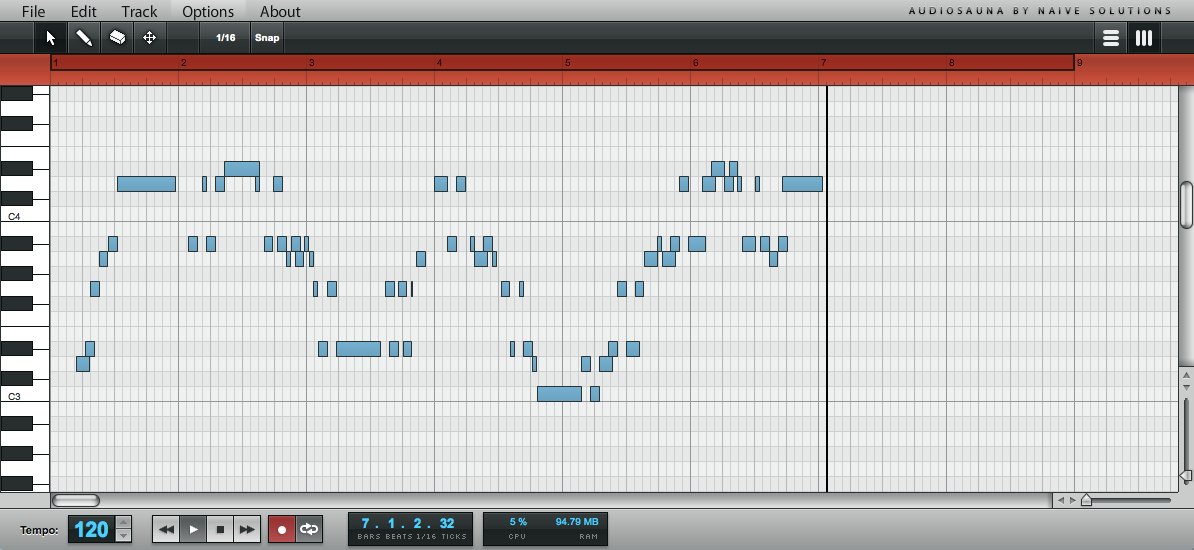
| The recorded notes appearing in the piano roll view. |
We listen to the feedback we get very carefully, and one of the most requested features has been the possibility to record notes. So today AudioSauna gets a major improvement as you can now use the computer's keyboard to record notes.
Today's update brings two different ways to record notes to the song:
- You can record notes live as the song is playing.
- You can record notes using the AudioSauna's step sequencing feature.
For recording notes live, simply press down the play and record buttons, and everything will be recorded to the selected track. The notes can be quantized live as you record by toggling the "Snap" button on the tool bar. For example, select 1/32 from the menu to quantize everything you play to 1/32 notes etc.
By pressing down just the record button, the played notes will be added to the track step-by-step, each note following the next. Like in the live recording mode, the step size is the same as the Snap size. So to record 1/16 notes, simply select 1/16 from the menu and make sure the "Snap" button is pressed down.
Happy recording!

Hi there,
ReplyDeletehere are just ome future tasks, but I would really LOVE to have those features in the future:
* Audio-Recording with a locale app on my PC, and when the recording is finished, it starts the upload to my track
* Collaboration with others on one song - so i can invite my musician-friends with an email and we can work together on a hot track
* Implementation of third-party plugs with the ability to buy cool new virtual instruments or sample-banks
Think about those features!
GreetZ
DiggNity
Great ideas, notice taken! Audio recording and collaboration are something what we're actually planning to do sometime in the future.
DeleteHi, great product, bringing back memories ofplaying on a Moog Prodigy in the 80s.
ReplyDeleteIs it (or will it be) possible to connect a midi keyboard to Studio?
Thanks
Spook
Midi is coming in the future. No set timeline for that, and we'll work with some more basic features before that (like midi note volumes)
DeleteAny hope of midi support?
ReplyDeleteMidi is coming in the future. No set timeline for that, and we'll work with some more basic features before that (like midi note volumes)
DeleteI hit the record button and then played with the sustain and decay on a track, but after I stopped the record it didn't play it back for me. Doesn't it have real-time recording when playing with the knobs? does it only record if you play on the keyboard?
ReplyDeleteAudiosauna does not record in real time (As far as I am aware) and you basically have to construct your song piece by piece. You can record with the keyboard yes, but you can also wrote in notes and stretch them, using the pencil tool in the upper left corner.
DeletePlease contact me if you're still having trouble. :)
Firstly wonderful work people. I am sorry if I sound ignorant, I am not very well versed with keyboards but need the sound badly for a guitar track I Made. I am not able to record the way I want to. When I play with my pc keyboards, it does not record sustained notes. It records one note every click. So If I am using an organ choir, i have to click 10 times to get 10 notes. While what I want is a single note that extends 10 seconds
ReplyDeleteI hope I am able to make you guys understand what my problem is
Hi! I know exactly what you mean! I had to discover a way to make ambient sounds with prolonged notes and sort of came up with something. Basically what you want to do is put the 'attack' up. This is the 'A' above the up and down slider on the Synth. This should give you exactly what you want. Also it might be an idea to play around with the other sliders to really pinpoint the sound.
DeleteI have spent many hours trying to replicate a solid guitar sound. Honestly, I don't think it can be done. Not the way I want it to sound anyway. Also remember to stretch the note on the stave with the 'selection tool'. So that the note can breathe for a longer time.
I hope this helped
Do contact me if you have further trouble. :)
Well guys....I am not getting the KEYBOARD to RECORD either by PRESSING the KEYS with the MOUSE or on the EDGE of the PIANO ROLL....
ReplyDeleteThe only way I get anything to playback is if I use the PENCIL TOOL
Why is that?
I assumed this would be working as RECORD LOOP
but this is just BUGGY or so it seems.....
Why?
Can somebody help me ? or is this just the way it goes? thanks
Hi there! Pressing the record button and then clicking the notes will not work. What you have to do is press the keys on your actual computer keyboard. You can do this and look at the synth as a reference as to what notes you're playing. You can see pushed down notes on the roll too!
DeleteI hope this helped you and I hope your creativity hasn't been stunned!
Make some tunes!
Contact me if you need more help. :)
hey this feature does not work for me and I would really love it too :) any advice?
ReplyDeleteWhat exactly are you having trouble with my friend?
Delete-Tom the expert
is there a metronome?
ReplyDeleteI don't think so. As it does not record in real time I'm not sure there is much point. Maybe they'll add it in the future.
DeleteI made a song and saved it to my computer. Later I opened it but play feature doesn't work. I can't play my song. :/
ReplyDeleteAny help?
ReplyDeletesearching for a way to find "GHOST-TRACKS" that are recorded into nothingness.... the only way I have found to edit them is to delete the entire instrument. which can be extremely frustrating if I have recorded a lot and custom made sounds. The piano roll shows up blank and no amount of fiddling has yielded any locatable or otherwise visual representation of these tracks. I have this issue EVERYTIME that I try to add to an existing track to extend the melodic direction of the song I am working on.
ReplyDelete